- Dealer Enquiry Form
- mailto: info@scoto.in

- Mon - Sat: 9:30AM - 6:45PM
MOBILE APP DEVELOPMENT
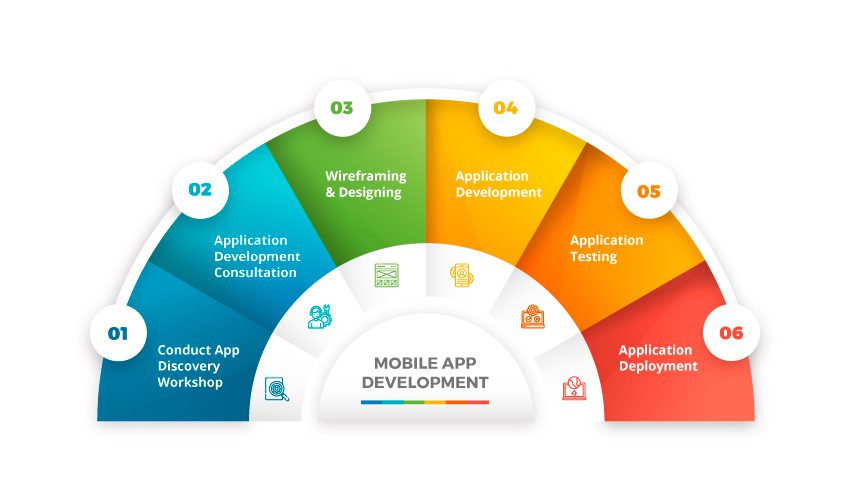
Mobile app development is a dynamic field focused on creating software applications tailored for use on smartphones and tablets. It involves various stages, from conceptualization to deployment, ensuring compatibility with different mobile operating systems such as Android, iOS, and Windows Mobile. Developers utilize a range of tools and technologies to build efficient and user-friendly apps. Each operating system presents unique challenges and opportunities, influencing the development process and user experience. Security, performance, and user interface design are critical considerations throughout app development, aiming to deliver seamless and engaging experiences to users. Continuous testing, iteration, and optimization are essential to refine apps and address any issues before release.
In the ever-evolving world of mobile app development, developers face a plethora of choices. Let’s explore the unique aspects of crafting applications for Android, iOS, and the Zend Framework.
Android Development
iOS Development
Zend Framework
- Define the app concept, target audience, and objectives.
- Conduct market research and analyze competitor apps.
- Create user personas and identify user needs.
- Develop a project plan, including timelines and milestones.
- Gather functional and non-functional requirements.
- Prioritize features based on user needs and business goals.
- Define technical specifications and constraints.
- Create user stories and use cases.
- UI/UX Design: Create intuitive and visually appealing interfaces.
- Design user flows and wireframes for navigation.
- Ensure consistency in design elements and branding.
- Use design tools like Sketch, Figma, or Adobe XD.
- Implement the user interface using XML for layouts and Java/Kotlin for logic.
- Utilize Android SDK components for UI elements.
- Ensure responsiveness across different screen sizes and resolutions.
- Implement animations and transitions for a polished user experience.
- Choose an appropriate server-side technology (e.g., Java, Kotlin, Node.js).
- Design and develop the server architecture.
- Implement business logic and data processing.
- Integrate with databases and external APIs.
- Choose a suitable database technology (e.g., SQLite, MySQL, Firebase Realtime Database).
- Design the database schema to efficiently store and retrieve data.
- Implement CRUD (Create, Read, Update, Delete) operations.
- Ensure data security and integrity.
- Integrate with external APIs for functionalities like authentication, payments, and geolocation.
- Handle API requests and responses asynchronously.
- Implement error handling and retry mechanisms.
- Secure API communication using HTTPS and authentication tokens.
- Conduct unit testing for individual components and modules.
- Perform integration testing to ensure seamless interaction between components.
- Implement automated UI testing using frameworks like Espresso or UI Automator.
- Test on a variety of devices and screen sizes to ensure compatibility.
- Generate a signed APK (Android Package) for distribution.
- Publish the app on the Google Play Store following Google's guidelines.
- Set up alpha and beta testing channels for gathering feedback.
- Monitor app performance and user feedback after deployment.
- Implement secure coding practices to prevent vulnerabilities.
- Encrypt sensitive data stored locally or transmitted over the network.
- Use secure authentication mechanisms (e.g., OAuth, JWT) for user authentication.
- Regularly update dependencies and libraries to patch security vulnerabilities.
- Monitor app performance and user feedback for continuous improvement.
- Address bugs and issues reported by users promptly.
- Roll out updates and new features based on user feedback and market trends.
- Provide ongoing technical support to users.
- ntegrate analytics tools (e.g., Google Analytics, Firebase Analytics) for tracking user behavior and app usage.
- Monitor app performance, crashes, and errors using crash reporting tools.
- Analyze data to gain insights into user engagement and app performance.
- Use data-driven decisions to optimize user experience and app performance.